
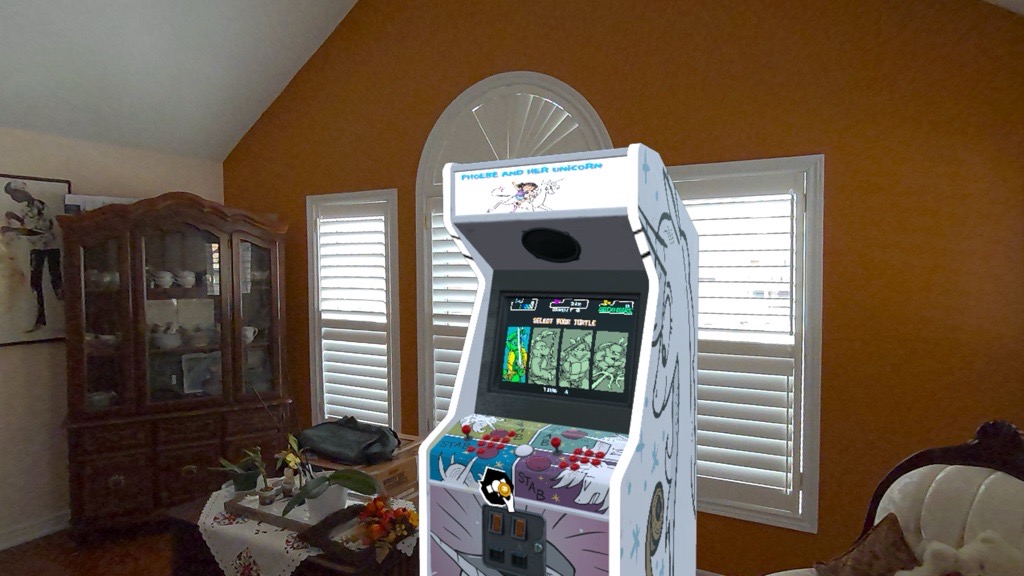
Create your own custom arcade with VR and a new controller.
Bring classic arcade cabinets into your home in this immersive virtual reality (VR) experience.
Remember being young and going to the arcade, coins at the ready to play whatever looked interesting? Whether you were a fan of fighters like Mortal Kombat, lightgun shooters like Time Crisis, or a classic like Pac-Man, one could lose an afternoon – and all their allowance – trying to make it a little further in their favourite game.
With arcades disappearing over the years, those nostalgic for the days of yore have had a growing number of options to bring it into their home.
Emulation through computers is the easiest option with things being as simple as loading the program and acquiring ROMs. Those with the ability can even turn simple emulation into a fully working cabinet.
If building isn’t your thing, there’s a number of licensed arcade cabinets you can purchase. Of course, these are limited in the styles and games offered; not to mention expensive.
For VR users with a Quest headset, there’s an even easier way to bring an arcade cabinet into your space, thanks to Arcade Ranger. Developed by Pumpkin VR, the game has been allowing the creation of an arcade in both full VR and mixed reality (MR) since 2024.
While there is a bit of work to get things started – you’ll need to start the game and download the necessary cores for emulation before connecting your headset to a computer to add your ROMs – it’s not that difficult if you follow the instructions.
It should be noted right away that the game does not come with any ROMs, you will need to supply your own legally obtained files. Of course, those files are just a search away…
Once your games are in the appropriate folders and everything is set, your fun can start as the game allows you to create any number of arcade systems. You can even design your own cabinets and fill your room with the games you want to play.
What’s more, if you own the Arcade2TV-XR controller, you can seamlessly connect it to your headset and feel like you’re really at an arcade cabinet.
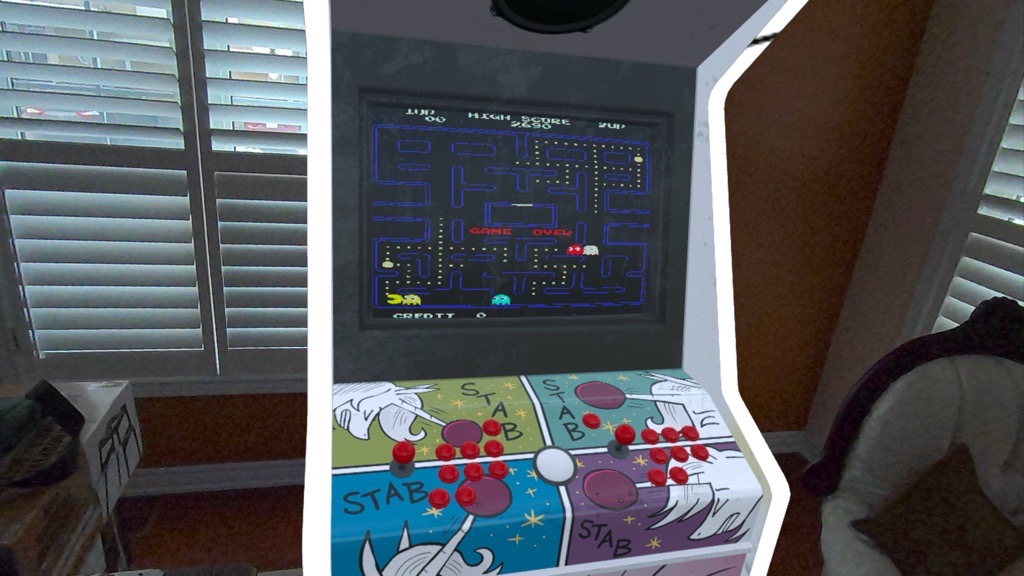
The controller in question features multiple joysticks and buttons, allowing for use on both computers and VR – though in VR you can only use the single player settings.
Regardless, this device brings all the immersive feelings of an arcade system right into your space – especially when you set up a cabinet.
While it’s certainly not perfect – there are some hiccups like the Quest controllers not disappearing when you’ve setup the cabinet – playing the game in MR pretty seamlessly blends a cabinet over your Arcade2TV-XR, making it look like the cabinet is in your space.
From here all you have to do is boot up a game and get ready to play.
Arcade Ranger allows for emulation across a few different emulators including Multiple Arcade Machine Emulator (M.A.M.E.), Sega Genesis, and Super Nintendo among others. Of course, for extras you’ll have to find the cores online – along with the ROMs.
For the classic arcade games, you’ll want M.A.M.E. Be aware that not all games work, while some require additional BIOS files that don’t actually work with the system in its current format.
The best way to figure out if something works is to test it on your computer before loading onto your headset. Expect a lot of trial and error, and black screens which don’t seem to do anything, as you work to find the right games for you.
The games that do work play as well as they should, though you may come across issues where you’ll need to fix the trackball for games like Golden Tee or Shuffleshot, as the default sensitivity settings are far too low. You’ll need to play around with things to fit your style, but the easiest way to do this is to remap the ‘L3’ and ‘R3’ buttons to one of the unused buttons on the second player side. This allows you to edit controller, game and other settings you couldn’t otherwise access.
Graphically the cabinet that gets placed in your space – whether it’s one of the stock designs built into the game, or one of your own making – look extremely well done. The way the game overlays the cabinet over the Arcade2TV-XR controller is also pretty seamless, though as noted earlier, there are bugs which can be rather off-putting and can detract from the immersion.
The games themselves are what you might expect: they are from the 80s and 90s after all. Remember, these games were played on CRT televisions during a time when high definition wasn’t a thing, so don’t expect the actual emulated game to look anything more than authentic.
Now let’s touch on the mechanics and breakdown the issues quickly. Once you’re in game and you’ve either walked up to a VR cabinet – or jumped into MR mode and had your cabinet load into your space – you should be able to leave the Quest controllers in the slots on the top of the Arcade2TV-XR and use the joystick and arcade buttons.
To bring up the menu where you can select the emulator and respective ROM you want to play, you’ll push the player one and two buttons at the same time. While the menu is not that intuitive, it’s rather simple to navigate – almost like a poorly built folder system on an antiquated computer. You’ll notice right away that the ROMs listed in the folders are not properly named, instead you’ll see the old M.A.M.E. naming convention which can be confusing for those with a long list of games loaded.
For instance, while “TMNT” might easily point to which game you’ll be selecting, “MSH” might not immediately let you know that you’re about to play Marvel Super Heroes.
To start whichever game you want to play, you’ll use the button on the left side of the controller to load a coin, and then the player one button to begin your game. Simple right?
Aside from the naming convention, which seriously needs to be updated, there are a few other bugs worth noting.
As noted earlier, the Quest controllers – which show as a blue holographic instance of themselves in game – don’t always disappear. If you leave them on the respective controller slots, you’ll often find that these will intrusively be in your way – sometimes even clipping into the game screen.
In the best cases, the controllers disappear and you’ll see virtual hands appear which align pretty well – in most instances – however, this is only the case in less than 10 per cent of playthroughs. Most of the time you’ll encounter the issue above, which shows a laziness of the developer who doesn’t seem very active in making fixes.
Finally, the biggest issue seems to be that the game does not support ROMs that require an additional BIOS – this means you’re left without the ability to play a slew of games – including some bigger titles.
As you can see, many things require the developers to support the game they sell, but who knows if that’ll happen. They encourage you to join their Discord server if you have questions, however, the developers seem to avoid it like the plague; basically no questions answered and help hardly given – unless another user happens to step up.
Overall, Arcade Ranger is an excellent title that takes a bit of work to setup; but once you do it’s well worth the effort.
Keeping in mind what was noted above about the issues currently plaguing the game, if there are titles you absolutely want to play and you know it needs a BIOS file, you’re out of luck. The other things, while a nuisance, can be ignored and avoided for a pretty great playing experience.
While it’s not necessary to own the Arcade2TV-XR to play and make this work, playing this game with the standard Quest controllers is just not as satisfying. The Arcade2TV-XR is built to bring feel of playing at an arcade into your space, and there really is no better way to play these games in VR without it.
Certain games – those that would normally require a steering wheel, lightgun, or another peripheral beyond the standard arcade controls of buttons and joysticks – don’t work here. This is unfortunate, as it would be great to play the likes of House of the Dead or Out Run with your VR cabinet.
But for what it is, the Arcade2TV-XR is probably one of, if not the best peripheral devices on the market to make your experience in VR that much more immersive.
Once the developers at Pumpkin VR fix the issues with games that require a BIOS, they should consider adding more peripheral devices – i.e. a steering wheel or lightgun – so more arcade games can be brought home in VR.
Arcade Ranger was reviewed after receiving for free with the purchase of Arcade2TV-XR